
In This Article
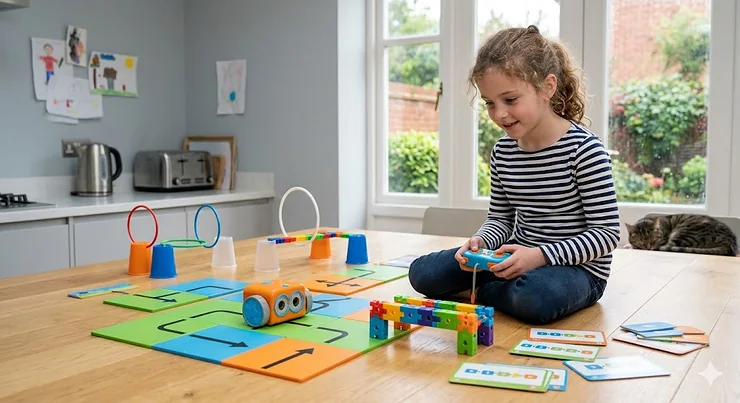
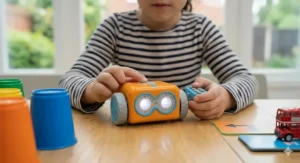
There’s a particular kind of Saturday morning magic that happens when a five-year-old sits on the living room floor — no iPad, no telly, no parental cajoling — and figures out, entirely by themselves, how to make a small blue robot navigate around a pile of building blocks. It clicks. Not just the robot, but something in their brain. That’s what the Botley 2.0 coding robot does rather well.
Screen-free, tactile, and genuinely clever in its design, Botley 2.0 is a hands-on programming toy that teaches children the fundamentals of coding — sequencing, loops, conditional logic — through a chunky handheld remote and a cheerful little robot with light-up eyes. No app. No Bluetooth. No forty-five-minute setup ritual. Just batteries and a child who wants to see what happens next.
But Botley isn’t the only game in town. The UK market for coding robots and screen-optional programming toys has expanded significantly, and knowing which product genuinely suits your child — versus which one will live under the sofa by February — takes a bit of sorting. This guide covers the Botley 2.0 and six carefully chosen alternatives, with honest commentary on what each actually delivers for British families in 2026.
According to the UK National Curriculum for Computing, children as young as five are expected to understand algorithms and create simple programmes. A good coding robot isn’t a luxury; it’s a head start.
Quick Comparison: Top Coding Robots for UK Kids 🇬🇧
| Product | Age Range | Screen-Free? | Price Range (GBP) | Best For |
|---|---|---|---|---|
| Botley 2.0 Activity Set | 5–10 | ✅ Yes | £55–£65 | First-time coders, KS1 support |
| Botley 2.0 Single Robot | 5–8 | ✅ Yes | £40–£45 | Budget start, siblings |
| Ozobot Evo | 6–12 | ❌ App option | £90–£100 | Creative coders, classroom use |
| Makeblock mBot Neo | 8–14 | ❌ App required | £85–£95 | Builders, Scratch learners |
| Sphero BOLT | 8+ | ❌ App required | £120–£145 | Advanced users, families |
| BBC micro:bit V2 | 8–14 | ❌ Computer req. | Under £25 | School-aligned, KS2 |
| Code & Go Robot Mouse | 4–8 | ✅ Yes | Under £30 | Preschool and reception |
The table above reveals a clean split: screen-free robots cluster at the younger end and the more affordable price points, while app-dependent options scale up in complexity and cost. What the numbers can’t show is the friction involved — and friction matters enormously when you’re trying to hold the attention of a six-year-old. Botley’s immediate usability is a genuine competitive advantage that no spec sheet fully captures. If your child is under eight and you’re choosing their very first coding toy, the top two rows of that table are where to focus.
💬 Just one click — help others make better buying decisions too! 😊
✨ Don’t Miss These Exclusive Deals!
🔍 Take your child’s coding journey to the next level with these carefully chosen picks. Click on any highlighted product name to check current pricing and availability on Amazon.co.uk. Stock levels and prices shift — always worth a look before you decide.
Top 7 Coding Robots for UK Kids: Expert Analysis 🎯
1. Learning Resources Botley 2.0 Coding Robot Activity Set
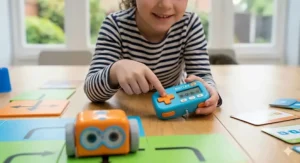
This is the one to buy. The full Activity Set comes with 78 pieces: the robot itself, the remote programmer, 40 coding cards, six double-sided tiles, 27 obstacle-building accessories, detachable arms, glow-in-the-dark stickers, and a starter guide with ten structured challenges. It’s the difference between handing a child a guitar and handing them a guitar with a beginner’s songbook — the context matters.
Botley can execute up to 150 sequential commands across six directions, detect and respond to obstacles using a front-facing sensor, follow black lines on the coding cards, and perform 16 different “transformation” interactions — including turning into a ghost, a train, or a police car, complete with lights and sounds. That last feature sounds like marketing fluff, and it is, but children adore it, and it keeps engagement alive past the first session.
For UK families watching screen time, this is genuinely valuable. There’s no Wi-Fi, no account to create, no app permissions to grant. You’re not handing your five-year-old a device that can accidentally end up on YouTube. The remote programmer is chunky and forgiving for small hands — no fiddly touchscreens, no tiny buttons. UK reviewers consistently note how quickly children pick it up without parental assistance, which, frankly, is the real test of any children’s toy.
Who is this for? Any child aged five to eight with a curious temperament and parents who’d prefer to ease into screen-based tech gradually. It also aligns neatly with KS1 computing objectives around understanding algorithms and following instructions.
✅ Genuinely screen-free with zero setup friction
✅ Obstacle detection teaches real conditional logic
✅ Durable build — survives enthusiastic primary-school handling
❌ Not expandable beyond the included accessories
❌ Will be outgrown by age nine or ten
Price range: £55–£65 for the Activity Set on Amazon.co.uk. Prime-eligible for next-day delivery. Solid value for a toy with genuine longevity across two to three years of use.
2. Learning Resources Botley 2.0 Coding Robot (Single)
The robot-only version, without the tiles and obstacle accessories. It’s tempting on price, and if you already own the Activity Set and want a second Botley for a sibling or classroom, this is sensible. But as a first purchase? Less so. The obstacle tiles and coding cards are what structure those crucial first sessions — without them, Botley tends to drive in circles on the kitchen floor looking vaguely purposeless, and a bored child won’t return to a toy that confused them.
That said, the single robot does include the remote programmer and coding cards, so basic sequencing is achievable. Think of it as the acoustic starter kit: functional, but missing some of what makes the full experience click.
✅ Lower entry price — accessible for gifting on a tighter budget
✅ Identical robot to Activity Set — same durability and feature set
✅ Good as a second unit for multi-child play
❌ Absence of obstacle accessories limits structured challenge
❌ Engagement may fade faster without the Activity Set’s scaffolding
Price range: £40–£45 on Amazon.co.uk. Prime-eligible.
3. Ozobot Evo Coding Robot
Barely larger than a ping-pong ball, Ozobot Evo is one of those toys that seems impossibly clever for its size. It reads colour-coded sequences drawn directly onto paper — draw a blue-red-green line, and Evo interprets it as a turning instruction. No remote required. At a more advanced level, the OzoBlockly app introduces block-based coding that progresses through five difficulty modes, from beginner to genuinely challenging.
For UK families living in smaller homes (the national average for a semi-detached in Birmingham or a terraced house in Leeds doesn’t offer much floor space), Ozobot’s compact footprint is a practical advantage. It works beautifully on a dining table. Ozobot Evo sits in the £90–£100 range — noticeably pricier than Botley, and the app dependency may be a consideration if you’re managing screen time. But for children aged eight and above who’ve exhausted Botley’s ceiling, Evo offers a meaningful step up.
UK classroom teachers in particular rate Ozobot highly for group sessions; its colour-code system makes it inherently collaborative — children can design tracks together with markers before the robot follows.
✅ Genuinely tiny — works on a table, perfect for smaller UK homes
✅ Dual input: physical colour codes and block-based app coding
✅ Strong educational progression from beginner to intermediate
❌ App required for full feature access — screen time trade-off
❌ Higher price point than entry-level options
Price range: £90–£100 on Amazon.co.uk.
4. Makeblock mBot Neo (mBot2) Coding Robot Kit
The mBot Neo is a robot you assemble — which is either brilliant or a bit much depending on your child’s temperament. Assembly takes around twenty minutes, involves real screws and a screwdriver, and produces a satisfying, proper-looking robot with wheels, sensors, and an LED matrix display. It then connects to the mBlock app (a Scratch-compatible interface) for coding, and for more advanced users, Python is on the table.
For children aged eight to twelve who’ve graduated from simpler toys and want to understand how a robot actually works, not just what it does, mBot Neo is a compelling choice. It bridges the gap between play and genuine maker education. The Raspberry Pi Foundation — whose resources underpin much of UK computing education — champions this kind of physical computing as essential for developing real digital literacy. See their work at raspberrypi.org.
UK buyers should note the mBot Neo ships with a Type C USB charger; you’ll need a standard UK USB-A adapter, though most households have these in abundance.
✅ Assembly process teaches engineering thinking, not just coding
✅ Scratch-compatible — directly mirrors KS2 classroom tools
✅ Python-capable — serious longevity for motivated learners
❌ App-dependent, so screen time is unavoidable
❌ Assembly can frustrate younger or less patient children
Price range: £85–£95 on Amazon.co.uk.
5. Sphero BOLT App-Enabled Robot Ball
Sphero BOLT looks like a transparent ball containing the future, and it’s not entirely wrong. Inside the durable polycarbonate shell sit an 8×8 programmable LED matrix, infrared sensors, a compass, and a gyroscope. It pairs with the Sphero Edu app and supports JavaScript, Scratch, and Swift — meaning a sufficiently motivated teenager could use it as a genuine introduction to professional coding languages.
The catch? BOLT sits in the £120–£145 range on Amazon.co.uk, which is a significant spend for a toy. It earns that price through sheer longevity — there’s enough complexity here to hold a child’s interest from age eight well into their teens — but it’s a harder sell as a birthday gift without knowing the child well.
For competitive families with children involved in school robotics clubs or STEM days, BOLT is the one that tends to impress. It can play games against other BOLTs, communicate via infrared, and respond to physical orientation changes in real time. More impressive in practice than any spec list suggests.
✅ Supports JavaScript and Swift — genuine future-proofing
✅ Virtually indestructible — waterproof, durable shell
✅ Multi-robot play unlocks collaborative coding challenges
❌ Premium price requires confidence the child will engage long-term
❌ Requires consistent app access — no screen-free option
Price range: £120–£145 on Amazon.co.uk. Prime-eligible.
6. BBC micro:bit V2 Go Bundle
The micro:bit is less of a toy and more of a computing tool dressed up accessibly. Developed by the BBC and distributed free to every Year 7 pupil in England back in 2016, it’s since become a fixture of UK primary and secondary computing education. The V2 adds a microphone, speaker, and capacitive touch sensor to the original’s LED matrix and accelerometer. You programme it using the micro:bit MakeCode editor — a block-based interface in the browser that’s used in classrooms across the country.
For under £25, nothing else on this list comes close to its educational depth or curriculum alignment. A motivated ten-year-old with a micro:bit and an internet connection can spend an entire winter building projects. The limitation is that it rewards children who are already slightly curious about technology; it won’t do much to convert a reluctant coder.
✅ Under £25 — exceptional value
✅ Directly aligned with UK KS2 computing curriculum
✅ Enormous free resource library from the Raspberry Pi Foundation
❌ Requires a computer or tablet to program — not standalone
❌ No physical robot movement out of the box (add-on kits required)
Price range: Under £25 for the Go Bundle on Amazon.co.uk.
7. Learning Resources Code & Go Robot Mouse Activity Set
Designed for children as young as four, Code & Go Robot Mouse is where coding begins before the child can reliably read. The mouse — a cheerful, squeaky little creature — is programmed by pressing directional buttons on its back, then navigating a customisable grid maze. It’s tactile, forgiving, and specifically designed for the reception and Year 1 age group.
For parents whose children are slightly too young for Botley’s remote programmer, this is the natural stepping stone. The maze setup also works beautifully for quiet activities during British half-term weeks when you need something genuinely engaging that doesn’t involve a screen and a YouTube rabbit hole.
UK reviewers frequently note it as one of the best reception-year gifts available — teachers recommend it, and it regularly sells out around Christmas.
✅ Age 4+ — the youngest-appropriate robot on this list
✅ 100% screen-free, completely self-contained
✅ Grid maze builds spatial reasoning alongside coding logic
❌ Simple enough that children may outgrow it within a year
❌ Grid is fixed size — less flexible than Botley’s open-ended play
Price range: Under £30 on Amazon.co.uk. Prime-eligible.
How to Get the Most Out of Botley 2.0: A Practical Setup Guide 🛠️
Getting Botley out of the box is the easy part. Getting your child to return to it on day three, day seven, and day thirty? That’s where a bit of parental strategy goes a long way.
First session (days 1–2): Resist the urge to sit beside them explaining everything. Set up the obstacle tiles from the Activity Set, hand over the remote, and let them press buttons. The point of these early sessions isn’t successful coding — it’s discovering that button sequences produce movements. Let them fail. The moment they realise Botley can be made to avoid the obstacle rather than hit it, something clicks.
Progressive challenge (days 3–14): Introduce the concept of loops using Botley’s loop function on the remote. Challenge them to programme a route that returns Botley to its starting position. Then try the black-line following with the coding cards — set up a curved track and watch the satisfaction on their face when Botley traces it perfectly.
Obstacle detection and conditionals (week 3 onwards): This is where Botley earns its educational credentials. The “if/then” logic embedded in Botley’s obstacle detection mode teaches a concept that’s fundamental to all programming. Frame it as: “What should Botley do when it sees something in the way?” That’s a conditional statement. Most five-year-olds grasp it faster than most adults expect.
Practical note for UK homes: Botley works best on hard floors — kitchen tiles, laminate, or hardwood. It will struggle noticeably on carpet, particularly the thicker kind common in older British terraced houses. If you’re exclusively carpeted, a smooth placemat or a piece of card makes an excellent track surface at no cost.
Batteries: three AAA for Botley, two AAA for the remote. None are included. Buy them before Christmas morning.
Coding Robots for Different UK Family Profiles 🏡
Not every family needs the same robot. Here’s how to match the product to the reality.
The Screen-Time-Conscious London Family: You’ve got a six-year-old in a flat in Hackney, approximately 60 square metres of living space, and strong feelings about iPads before age eight. Botley 2.0 Activity Set is your answer. Screen-free, compact, and robust enough to survive the kind of enthusiastic handling that comes with limited indoor space. The maze can be set up on a dining table and dismantled in under two minutes.
The Curious Eight-Year-Old in Suburban Manchester: Already comfortable with a tablet, already done Scratch at school, starting to ask how robots actually work. mBot Neo is the pick here. Assembly is part of the fun, and the Scratch compatibility means what they build at home directly reflects what they’re doing in computing lessons. The Raspberry Pi Foundation’s free project library at projects.raspberrypi.org offers hundreds of coding challenges that work alongside mBot.
The Reception Class Teacher in Cardiff: You need something durable, immediately understandable for four-year-olds, and manageable across a group session. Code & Go Robot Mouse, ideally two or three sets so multiple children can work simultaneously. The grid-based maze is inherently collaborative — children can design routes for each other.
The Rural Family in the Cotswolds with a Ten-Year-Old Who Wants a Real Challenge: No coding club nearby, limited extracurricular tech provision, child who’s been through Botley and Code & Go and is asking what comes next. BBC micro:bit V2 for the winter, Sphero BOLT if the budget stretches. Both offer enough depth to occupy a motivated learner independently, without needing a classroom context to get value from them.
Features That Actually Matter (And Those That Don’t) 🔍
The marketing language around coding robots can be genuinely exhausting. Here’s what’s real.
Matters: True screen independence. If a toy claims to be screen-free but requires an app for half its features, it isn’t really screen-free. Botley and Code & Go Robot Mouse are genuinely, completely independent of screens. Everything else on this list has at least some app dependency. That’s not necessarily bad — but it should be an informed choice, not a surprise on Christmas morning.
Matters: Obstacle detection. This is the feature that distinguishes a toy robot from an educational coding robot. The ability to programme a conditional response — “if obstacle, then turn right” — is the moment abstract coding logic becomes physical and real for a child. Botley’s front-facing sensor delivers this cleanly. Not all budget robots do.
Matters: Progressive difficulty. A robot that a five-year-old can use but a nine-year-old won’t outgrow in a month is dramatically better value. Botley’s 150-step programming capacity and loop functionality ensure it scales. Code & Go, by contrast, is genuinely a stepping stone — fine for what it is, but honest about its ceiling.
Doesn’t much matter: The number of “personalities.” Botley’s 16 transformation modes (ghost, train, police car, etc.) are fun for approximately one afternoon. They don’t add to coding learning. They’re not a reason to buy or avoid the product.
Doesn’t much matter: App ecosystem size. A robot with ten thousand downloadable challenges via an app is only valuable if a child will actually use them. Most won’t get past the first twenty. Prioritise a strong core experience over an enormous peripheral library.
Common Mistakes UK Parents Make When Buying Coding Robots ⚠️
Buying the robot-only version to save money. As discussed above: the Botley 2.0 Activity Set costs roughly £15–£20 more than the solo robot, and that gap buys the obstacle accessories and tiles that structure the first three to four sessions. Without them, the learning curve is steeper and the risk of the toy going unused is meaningfully higher.
Buying for the wrong age. Code & Go is genuinely not suitable for a seven-year-old who wants a challenge. Sphero BOLT is genuinely overwhelming for a five-year-old who’s never coded before. The age recommendations on these products are more accurate than most — trust them.
Overlooking battery requirements. Every single robot on this list requires batteries that are not included. AAA batteries, AA batteries, USB-C chargers — check the product listing before you wrap it. Nothing deflates a Christmas morning quite like a robot that won’t turn on.
Expecting results without parent involvement. Coding robots work best when an adult occasionally sits beside the child, asks questions (“What do you think will happen if you press this?”), and introduces the vocabulary — algorithm, loop, sequence. You don’t need to know how to code. You just need to be curious alongside them. The BBC’s own resources on computing for parents are a low-effort starting point for getting your vocabulary up to speed.
Buying for a child who prefers building to driving. If your child’s passion is assembling things — LEGO Technic, Meccano, anything with instructions and small parts — mBot Neo will hold their attention far longer than Botley. Know your child’s instinct before you buy.
Botley 2.0 vs App-Based Coding Robots: The Honest Comparison
The screen-free versus app-based debate matters more to parents than to children, which is worth acknowledging upfront.
Children don’t typically care whether they’re using a remote programmer or a tablet interface — they care whether the robot does what they intended. What parents care about is total daily screen time, and for families already navigating a child who’d happily spend six hours on a tablet, adding another screen-facing educational activity can feel like losing a battle while technically winning one.
Botley’s screen-free approach is genuinely rare. Most of its competitors — Ozobot Evo, Sphero BOLT, mBot Neo — depend on apps for their more advanced features. That’s not inherently wrong; app-based coding interfaces are often genuinely excellent, and the Scratch-based editors used by mBot and micro:bit directly mirror tools children use in school. But it is a trade-off. Botley accepts a ceiling on complexity in exchange for complete screen independence. Whether that trade makes sense depends entirely on your child’s age and your household’s screen time philosophy.
One thing neither side of the debate changes: physical coding robots outperform purely digital coding apps for young children every time. Watching a real object respond to your instructions — actually moving across a real floor — creates a feedback loop that screen simulations can’t replicate. Research from the Raspberry Pi Foundation consistently supports physical computing as a more effective entry point for young learners than purely digital approaches. The tangible consequence makes abstract logic concrete.
✨ Ready to Get Your Child Coding?
🔍 All the products above are available on Amazon.co.uk. Click any highlighted product name to check current pricing, availability, and Prime delivery options. Prices shift frequently — checking directly is always the most accurate approach.
FAQ ❓
❓ Is Botley 2.0 available on Amazon.co.uk with UK delivery?
❓ What age is Botley 2.0 best suited to?
❓ Does Botley 2.0 align with the UK National Curriculum for Computing?
❓ Can Botley 2.0 work on carpet?
❓ Are there coding robot options for children under five in the UK?
Conclusion: Which Coding Robot Is Right for Your Child? 🎯
The Botley 2.0 coding robot remains the standout recommendation for children aged five to eight, and particularly for families who want a genuinely screen-free experience. Its Activity Set provides enough structure and challenge to stay relevant across two to three years of a child’s development, and its alignment with UK KS1 computing curriculum makes it as useful in an educational context as it is enjoyable at home.
Beyond Botley, the right choice depends on age and instinct. Younger children benefit from Code & Go Robot Mouse’s tactile simplicity. Children who love building should look at mBot Neo. Teenagers or highly motivated older children will find Sphero BOLT or BBC micro:bit V2 the most durable and genuinely educational options at their respective price points.
Whatever you choose: the act of buying a physical coding robot rather than another app subscription is already a sound instinct. Children learn to code most effectively when they can see and touch the results of their instructions. That’s not a marketing line — it’s what the evidence from organisations like the Raspberry Pi Foundation consistently supports.
✨ Find the Perfect Coding Robot Today!
🔍 Browse the full range of coding robots on Amazon.co.uk and choose the one that fits your child’s age, your home’s layout, and your screen-time preferences. Every highlighted product in this article links directly to its Amazon.co.uk listing for current pricing and availability.
Recommended for You 📚
- LEGO Boost vs LEGO Mindstorms: Which UK Coding Kit Wins in 2026?
- Best Osmo Coding Starter Kit UK: 7 Top Picks for 2026
- Sphero BOLT Review 2026: Is It the UK’s Best Coding Robot for Kids?
Disclaimer: This article contains affiliate links. As an Amazon Associate, I earn from qualifying purchases. If you purchase products through these links, we may earn a small commission at no additional cost to you.
✨ Found this helpful? Share it with your mates! 💬🤗
