
In This Article
Here’s a scenario that plays out in living rooms across Britain every Christmas, birthday, and “just because they aced their SATs” moment: a parent stands in the digital aisle — or, more likely, stares at a laptop at half ten on a Tuesday — trying to work out which Wonder Workshop robot is actually worth the money.
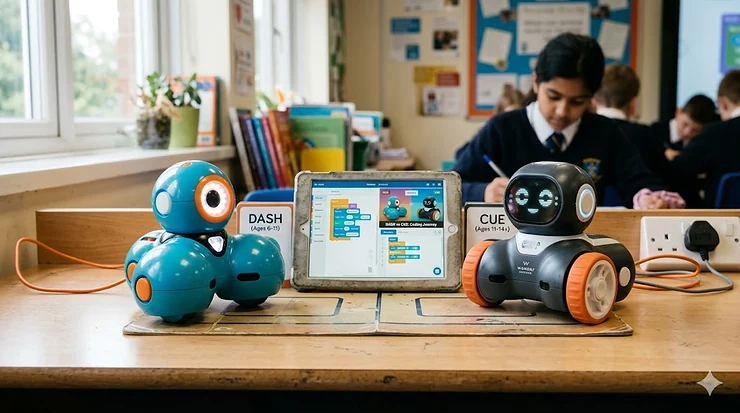
The answer, in short, depends almost entirely on your child’s age and how serious they are about coding. Wonder Workshop Dash vs Cue isn’t a battle of good versus better — it’s a question of right now versus ready for more. Dash is a brilliantly engineered introduction to programming for children aged 6–11, cheerful and approachable as a Labrador puppy. Cue, aimed at ages 11 and up, is its older, cooler sibling — the one who reads GitHub forums for fun and has opinions about JavaScript syntax.
Both robots are available on Amazon.co.uk and both have earned their place in tens of thousands of classrooms worldwide, including in UK schools where computing has been part of the National Curriculum since 2014. The real question is which one belongs in your home this year. Let’s find out.
Quick Comparison: Dash vs Cue at a Glance
| Feature | Wonder Workshop Dash | Wonder Workshop Cue |
|---|---|---|
| Recommended Age | 6–11 years | 11+ years |
| Coding Languages | Blockly, Wonder, Path, Xylo, Go (visual block) | Blockly, Wonder, JavaScript (text-based) |
| AI Features | Basic voice response | Emotive AI, 4 avatars, chat function |
| Sensors | Microphones, IR, proximity, gyroscope | All of Dash’s + gyro, accelerometer, encoders (upgraded) |
| Battery Life | Up to 5 hours active play | Up to 5 hours active play |
| Accessories Compatible | Yes (Sketch Kit, Launcher, Gripper, Bulldozer) | Yes (compatible with most Dash accessories) |
| Production Status | Currently available | Discontinued but still fully supported |
| Price Range (Amazon.co.uk) | Around £100–£130 | Around £150–£200 (varies as discontinued) |
| Best For | First-time coders, KS1/KS2 | Experienced young coders, KS3 |
What the table tells you: Dash is your go-to if your child is in primary school and hasn’t coded before. Cue makes more sense if they’ve already outgrown drag-and-drop challenges and want to write actual code. One important note for UK buyers: Cue has been discontinued by Wonder Workshop (they now funnel older learners toward Dash with Blockly Pro), so while stock is available on Amazon.co.uk, it won’t be replenished forever. If you’ve been sitting on the fence about Cue, now is genuinely the moment to decide.
💬 Just one click — help others make better buying decisions too! 😊
✨ Don’t Miss These Exclusive Deals!
🔍 Take your child’s coding journey to the next level with these carefully selected products. Click on any highlighted item to check current pricing and availability on Amazon.co.uk. These picks will help you find exactly what you need!
Top 7 Wonder Workshop Products: Expert Analysis
1. Wonder Workshop Dash Robot — The Gold Standard for Young Coders
Dash is where most children in the UK begin their robotics journey, and there’s a very good reason for that. It arrives fully assembled — no fiddly construction, no lost screws, no parental tears — and connects to a free suite of five apps via Bluetooth in minutes.
The specs that matter: three microphones that detect sound direction, front and rear proximity sensors, infrared transmitters, a built-in gyroscope, and a rechargeable battery that gives up to five hours of active play before needing a charge via USB. That last point is worth emphasising — five hours is genuinely long enough for an afternoon of school coding club without a panicked hunt for a charging cable mid-session.
Who is Dash best for? Honestly, the seven-year-old who gets frustrated with abstract maths worksheets but will spend three hours debugging why their robot won’t navigate around the kitchen table. The visual Blockly programming interface has what educators call a “low floor, high ceiling” — it’s simple enough for a child who’s never coded before, but deep enough to keep a bright ten-year-old engaged for months. UK parents often note that Dash integrates beautifully with Apple Swift Playgrounds, which means it has longevity beyond the bundled apps.
UK reviewers consistently praise the durability. British homes tend toward hard floors — tile, laminate, the occasional flagstone — and Dash handles drops and hard knocks with considerable grace. Worth noting for smaller homes: the robot is compact (roughly 15 cm in diameter) and stores neatly on a bookshelf.
✅ Comes fully assembled, ready immediately
✅ Five free apps covering beginner to intermediate coding
✅ Excellent classroom and home use credentials
❌ Will feel limiting for children over 11 who want text-based coding
❌ No AI personality or chat function
Price range: Around £100–£130. Solid value for an award-winning robot used in over 40,000 schools globally.
2. Wonder Workshop Cue Robot (Onyx) — For the Child Who’s Already Bored of Blockly
Cue is a different beast entirely. Where Dash is friendly and colourful, Cue comes in a sleek Onyx (near-black) finish that quietly announces: I am not a toy for six-year-olds. It’s aimed squarely at the 11–14 age group — secondary school students who’ve mastered block coding and want to write actual JavaScript.
The headline feature is Emotive AI: Cue has four distinct personality avatars (Hal, Charge, Rook, and Edge) that you select and interact with via text chat. The vocabulary library reportedly exceeds 170,000 words, and the robot will banter back with snappy responses, jokes, and its own take on your programming decisions. For a teenager who thinks coding robots are “a bit babyish,” this chat function is frequently the thing that changes their mind.
Technically, Cue packs upgraded sensors compared to Dash — better processor, more memory, three proximity sensors, four infrared transmitters, an accelerometer, gyroscope, and wheel encoders that enable considerably more precise movement programming. The JavaScript environment is built on Microsoft’s MakeCode platform, which means the transition from block code to text-based programming is genuinely seamless — children can toggle between both views with a single tap, which is pedagogically clever and takes a lot of the terror out of “real” coding.
The catch: Cue has been discontinued by Wonder Workshop, so UK availability on Amazon.co.uk is finite. App support continues, and if your child is in the right age bracket, a gently used or remaining-stock Cue is still worth serious consideration.
✅ Genuine JavaScript text coding, not just blocks
✅ Emotive AI personality — surprisingly engaging for tweens
✅ MakeCode platform familiar to many UK school students
❌ Discontinued — Amazon.co.uk stock is limited
❌ Steeper learning curve for children under 11
Price range: Around £150–£200, depending on availability. Check current pricing on Amazon.co.uk.
3. Wonder Workshop Wonder Pack (Dash + Accessories Bundle) — The Smarter First Purchase
If you’re buying Dash for the first time, the Wonder Pack bundle deserves serious consideration over the standalone robot. It includes the Dash robot along with the Sketch Kit (a drawing attachment that lets Dash create geometric patterns and artwork), building brick connectors, and additional accessories that dramatically expand what children can programme the robot to do.
The Sketch Kit alone transforms Dash from a coding toy into a creative STEAM project. Position the marker at the base, programme a path in Blockly, and watch the robot produce precise geometric shapes — it’s the kind of hands-on evidence that maths and code are the same language, just written differently. For UK children working toward KS2 computing objectives, this is particularly useful, as block-based coding aligns directly with National Curriculum aims around algorithms and decomposition.
Parents often find the bundle represents better value than buying accessories separately. The accessories are solidly constructed — no flimsy plastic that’ll snap after a fortnight — and designed to attach and detach easily enough for a seven-year-old to manage independently.
✅ Far better value than individual accessory purchases
✅ Sketch Kit enables cross-curricular maths and art projects
✅ Ideal first purchase for primary-aged children
❌ Bulkier to store than the standalone robot
❌ Some accessories suit older children more than younger ones
Price range: Around £130–£160. Check current pricing and bundle contents on Amazon.co.uk, as configurations can vary.
4. Wonder Workshop Sketch Kit for Dash and Cue — The Quiet Overachiever
Sold separately, the Sketch Kit is one of those accessories that looks modest on paper but earns its place quickly. The harness positions a marker tip at the exact centre of the robot’s base, allowing children to programme precise geometric shapes, spirographs, and patterns. Crucially, it works with both Dash and Cue — and in the Cue’s JavaScript environment, the results can be genuinely impressive, the kind of thing a 12-year-old will show off to their friends rather than hide under the bed.
For UK families in smaller homes, this accessory is particularly practical: it requires only a sheet of A3 paper on the floor, no large open space. Whiteboard markers work equally well if you have a portable whiteboard, which many UK schools and some homes already own.
The educational value goes beyond “robot drawing things.” Programming precise shapes requires children to understand angles, coordinates, and loops — computational thinking wrapped up as art. Research consistently shows that cross-curricular STEAM learning, particularly where coding meets arts subjects, sustains engagement better than single-subject approaches.
✅ Works with both Dash and Cue
✅ Compact storage, small floor footprint — ideal for UK homes
✅ Cross-curricular STEAM value (computing + maths + art)
❌ Requires smooth floor surface or dedicated drawing paper
❌ Markers not included
Price range: Around £25–£35. One of the better-value accessories in the Wonder Workshop range.
5. Wonder Workshop Gripper for Dash and Cue — Engineering Challenges Made Real
The Gripper attachment gives Dash and Cue the ability to pick up and carry small objects — opening up an entirely different category of coding challenges. Children programme the robot to navigate to an object, position the gripper, close it, transport the item, and release it at a target location. That sounds simple. It isn’t, and that’s the point.
In practice, this accessory is where children encounter the genuine complexity of robotics: sensor calibration, error handling, and what engineers call “edge cases” — the moments when the robot does exactly what you programmed it to do, not what you meant for it to do. For a curious ten-year-old, this is a formative coding lesson. For a twelve-year-old using Cue’s JavaScript environment, it’s the beginning of understanding how real robots in warehouses and factories actually work.
UK parents note this works well in kitchens or on low tables — manageable in a terrace or flat. The Gripper is robustly built and attaches securely, which matters when a child has spent forty minutes programming a complex routine.
✅ Teaches genuine robotics problem-solving
✅ Compatible with both Dash and Cue robots
✅ Excellent for engineering challenges at KS2/KS3 level
❌ Requires precise surface height — can be temperamental on carpet
❌ Young children may find the precision programming frustrating
Price range: Around £20–£30 on Amazon.co.uk.
6. XANAD Case for Wonder Workshop Dash / Cue Robot — Underrated but Essential
Not glamorous, but worth mentioning. A dedicated carry case for either robot is one of those purchases that parents retrospectively wish they’d made earlier, usually after the first time a Dash gets banged about in a school bag or a Cue arrives at a coding club with a damaged charging port.
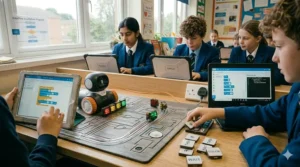
The XANAD case (available on Amazon.co.uk for both robots) features a mesh storage pocket for the USB cable and building brick connectors, reinforced padding, and a sturdy carry strap. At roughly 19 × 19 × 16 cm, it’s manageable in a school rucksack alongside a tablet.
For UK buyers, the practical consideration is this: if you’re purchasing Dash or Cue for a child who’ll be carrying it to school, coding club, or a grandparent’s house on a regular basis, the case pays for itself the first time it prevents an expensive repair.
✅ Protects a significant investment during transport
✅ Mesh pocket keeps cables and accessories organised
✅ Compact enough for school rucksacks
❌ Not made by Wonder Workshop — verify fit before purchasing
❌ Doesn’t fit Wonder Pack accessories alongside the robot
Price range: Around £15–£25 on Amazon.co.uk.
7. Wonder Workshop Launcher for Dash — The “Just Because It’s Fun” Accessory
Every product roundup needs one item that’s primarily here because it sparks genuine joy, and the Launcher earns that slot. Attach it to Dash, programme a launch sequence in Blockly, and the robot fires small balls at a target. That’s it. That’s the thing.
Except — and this is where it gets educationally interesting — getting the launch angle, distance, and trajectory consistently accurate requires children to programme loops, conditional statements, and sensor triggers. What looks like chaos is actually a physics and coding lesson in disguise, and one that a seven-year-old will voluntarily repeat for two hours. UK parents: this works brilliantly in hallways, which every British terraced house seems to have in abundance.
One note: the balls are small, and if you have a dog or a toddler, you will spend time retrieving them from behind radiators and under sofas. Consider yourself warned.
✅ Genuinely motivating — children code more to improve accuracy
✅ Introduces physics concepts through play
✅ Connects well to KS2 science curriculum
❌ Small projectile parts — not suitable for very young siblings
❌ Balls go absolutely everywhere
Price range: Around £20–£30 on Amazon.co.uk.
Setting Up Dash and Cue in a British Home: A Practical Guide
Here’s what most product listings won’t tell you. Getting the most out of either robot in a typical UK home requires a few minutes of thoughtful setup — and some awareness of the quirks that come with programming robots on British floors and with British devices.
Step 1: Download the apps before the robot arrives. Both Dash and Cue connect via Bluetooth to iOS, Android, and Kindle devices. The Wonder and Blockly apps are free and take a few minutes to download — do this in advance so Christmas morning or birthday excitement isn’t derailed by a slow Wi-Fi connection.
Step 2: Surface matters more than you’d think. Dash and Cue both perform best on hard, smooth surfaces. Laminate, tile, and hardwood are ideal. Carpet — particularly the kind found in older British homes — creates friction that throws off distance calculations and turning accuracy. If your home is mostly carpeted, a large piece of card or a yoga mat provides an excellent temporary surface and stores flat under a bed.
Step 3: Bluetooth range in compact spaces. UK homes are famously compact. Good news: the robots’ Bluetooth range (Bluetooth LE 4.0 on Dash, upgraded on Cue) works perfectly well in a single room and doesn’t require a dedicated space larger than about 2 metres square for most beginner activities.
Step 4: The charging routine. Both robots charge via micro-USB — the same cable used by many older Android phones and Kindle devices. Keep a dedicated cable with the robot; the USB charging approach is straightforward and the batteries are durable. Expect a full charge cycle of around 45–60 minutes.
Step 5: Internet connectivity. The apps don’t require a live internet connection once downloaded, which is handy for coding in the garden, in the car (road trips are transformed), or at school where Wi-Fi can be patchy. Initial setup and some curriculum features do require connectivity.
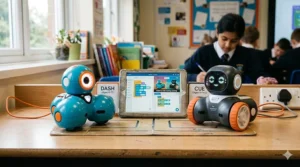
Real-World Scenarios: Which Robot for Which UK Family?
The Year 3 child in a Birmingham semi-detached: Your eight-year-old loves Minecraft and has started asking questions about “how the game knows what to do.” Dash is the right call. The Blockly app maps almost exactly to the logical thinking they’re already doing in Minecraft, and the physical feedback — watching code become movement in real time — is the kind of thing that cements computational thinking in a way a screen can’t. Buy the Wonder Pack if budget allows; the Sketch Kit alone will keep them occupied for weeks.
The Year 7 student in South London already comfortable with Scratch: Cue, if you can find it on Amazon.co.uk at a reasonable price. The JavaScript environment built on Microsoft’s MakeCode platform will feel like a natural step up from Scratch’s block coding, and the Emotive AI chat function has a disarming way of making a twelve-year-old forget they’re supposed to be too cool for this. Check availability promptly — as a discontinued product, stock is finite.
The Scottish primary school teacher looking for classroom kit: Dash is the professional choice here. It’s used in over 40,000 schools globally, the Make Wonder curriculum platform includes teacher dashboards and progress tracking, and at the price range it sits, a set of four or five robots is a manageable budget ask. The UK government’s Teach Computing curriculum resources align well with the programming concepts Dash introduces at KS1 and KS2.
The parent who just wants to give a “good present”: Dash, full stop. It works out of the box, it’s robust, the apps are free, and it’ll hold a child’s attention well beyond the novelty period — which, for most educational toys, is tragically brief.
How to Choose Between Dash and Cue: A Decision Framework
Choosing between these two robots really comes down to four questions. Answer them honestly and the right choice becomes fairly obvious.
1. How old is your child, and where are they in their coding journey? If they’re 6–10 and haven’t coded before, Dash. If they’re 11+ and have outgrown Scratch or similar platforms, Cue deserves strong consideration despite its discontinued status.
2. Do they want a robot with personality, or one that does what it’s told? Cue’s Emotive AI gives it genuine character — it chats back, has preferences, and reacts to how you programme it. This is genuinely engaging for tweens. Dash has character too, but it’s the loyal Labrador kind rather than the sarcastic older sibling kind.
3. How much do you value the ability to grow into text-based coding? Dash can now access Blockly Pro and the Make Wonder platform for more advanced programming — Wonder Workshop’s response to the Cue’s discontinuation. But if your child is ready for actual JavaScript right now, Cue’s environment is richer and more immediately rewarding.
4. How long do you need this purchase to last? An eight-year-old with Dash will get two to three excellent coding years before they want something more. A twelve-year-old with Cue will grow with it through secondary school. Budget accordingly.
| If… | Choose… | Because… |
|---|---|---|
| Child is 6–10, new to coding | Dash | Approachable, grows with them through KS2 |
| Child is 11+, knows Scratch or similar | Cue | JavaScript environment, AI personality, real depth |
| You want maximum accessory options | Dash | Broader accessory range currently in production |
| Budget is tighter | Dash | Lower price point, more readily available |
| You want a future-proof secondary school tool | Cue | JavaScript + MakeCode = skills that transfer to real projects |
Common Mistakes When Buying Coding Robots for UK Families
Buying for the parent, not the child. This one’s embarrassingly common. Dash is genuinely impressive — the product videos are compelling, the specs sound fantastic. But if your six-year-old is primarily interested in drawing and role-play, it’ll collect dust after a fortnight. Coding robots work best when the child has some existing curiosity about “how things work.”
Ignoring the app ecosystem. Both Dash and Cue require a compatible tablet or smartphone. If your household runs exclusively on an older Kindle Fire or a Windows tablet, check compatibility before purchasing. The apps work on iOS, Android, and Kindle Fire HD 8/10. They do not run on Windows devices.
Assuming Cue is still in full production. As noted above, Cue has been discontinued — Wonder Workshop confirmed this on their official website. The apps and curriculum continue to be supported, but hardware replacement parts and new stock are finite. This doesn’t make Cue a bad purchase; it just means UK buyers should check Amazon.co.uk availability carefully and not assume it’ll always be there.
Overlooking the floor surface issue. See the setup guide above. British carpets and Dash/Cue are not natural allies. This is a solvable problem, but worth knowing in advance rather than discovering on Christmas morning.
Forgetting about Bluetooth device limits. Both robots connect to one device at a time. In a household with multiple children, this can be a source of significant sibling conflict. Two children, one robot, one tablet — that’s a maths problem that requires more than coding to solve.
FAQ
❓ Is Wonder Workshop Dash available on Amazon.co.uk?
❓ What is the difference between Wonder Workshop Dash vs Cue for a UK primary school?
❓ Can Dash and Cue be used without internet in the UK?
❓ Is Wonder Workshop Cue still supported in the UK after being discontinued?
❓ Are Wonder Workshop robots compatible with UK tablets and iPads?
Conclusion: The Right Robot at the Right Age
The Wonder Workshop Dash vs Cue question ultimately has a satisfying answer: both robots are genuinely excellent, and neither is a wrong choice if you match them to the right child.
Dash is where most young coders in Britain should begin. It’s accessible without being patronising, robust without being clunky, and the free app ecosystem has depth that takes children through years of progressive learning. At its price point on Amazon.co.uk, it represents one of the more sensible STEM investments in the current market — particularly given how central computing is to the UK National Curriculum from KS1 onwards.
Cue, despite being discontinued, remains a compelling option for older children ready to bridge the gap between block coding and real JavaScript. If you have a child in Year 7 or 8 with genuine coding curiosity, finding remaining UK stock on Amazon.co.uk is worth the effort.
What neither robot will do: teach your child to code in isolation. They need time, curiosity, and the freedom to break things and try again. Provide those conditions, and either robot will repay the investment many times over.
✨ Don’t Miss These Exclusive Deals!
🔍 Ready to start your child’s coding journey? Click on any highlighted product in this guide to check current availability and pricing on Amazon.co.uk. Stock on Cue especially is limited — don’t wait too long!
Recommended for You
- Best Coding Robots for 10 Year Olds UK 2026 — Top 7 Picks
- Cubetto vs Matatalab Which Is Better for Kids in UK 2026?
- Bee-Bot vs Blue-Bot Comparison: Which Is Best for UK Classrooms? (2026)
Disclaimer: This article contains affiliate links. As an Amazon Associate, I earn from qualifying purchases. If you purchase products through these links, we may earn a small commission at no additional cost to you.
✨ Found this helpful? Share it with your mates! 💬🤗
