
In This Article
Picture this: it’s a rainy Saturday afternoon — which, if you live in Britain, is basically every other Saturday — and your child is glued to a screen. You’ve heard the parenting advice about “screen time,” but what if that screen time was actually building a future career? That’s the quietly radical promise behind the Sphero BOLT, a transparent robotic ball that’s part toy, part coding classroom, and entirely more interesting than it sounds.
This Sphero BOLT review will tell you everything you actually need to know — not the breathless marketing copy, but the real-world verdict. Who is this for? Is it worth the price in a cost-of-living crisis? And how does it stack up against the growing crowd of coding toys clamouring for a space on British shelves?
Here’s the short version: the Sphero BOLT is a programmable, app-enabled robotic ball featuring an 8×8 LED matrix display, a full suite of sensors (compass, accelerometer, gyroscope, light sensor, and infrared), and coding support that scales from drag-and-drop drawing all the way up to JavaScript and Python. It’s designed for ages 8 and up, works with the Sphero Edu app on iOS, Android, Mac, and PC, and is available on Amazon.co.uk in the mid-to-upper price range for educational toys. It is, in short, rather good — provided you’re buying it for the right reasons.
The UK’s National Computing Curriculum introduced coding as a compulsory subject back in 2014, and the pressure on parents and teachers to support that learning at home has only grown since. Whether you’re a parent trying to get ahead of the curve or a teacher looking for a classroom tool that doesn’t collect dust after the third lesson, this guide is for you.
Quick Comparison: Top Coding Robots Available on Amazon.co.uk
| Product | Best For | Coding Level | Age Range | Price Range (GBP) | Amazon.co.uk |
|---|---|---|---|---|---|
| Sphero BOLT | Depth & sensors | Beginner → Advanced | 8+ | £100–£160 | ✅ In stock |
| Sphero BOLT+ | Schools & power users | Beginner → Advanced | 8+ | £160–£200 | ✅ In stock |
| Sphero Mini | Budget entry point | Beginner | 8+ | £45–£60 | ✅ In stock |
| Makeblock mBot Neo | Build + code balance | Beginner → Mid | 8+ | £80–£110 | ✅ In stock |
| Wonder Workshop Dash | Younger children | Beginner | 6+ | £70–£100 | ✅ In stock |
| Ozobot Evo | Classroom & compact use | Beginner → Mid | 6+ | £70–£90 | ✅ In stock |
| Botley 2.0 | Screen-free first step | Beginner | 4–8 | £45–£65 | ✅ In stock |
The table above reveals a clear tiered market. The Sphero BOLT and BOLT+ sit at the premium end for good reason — their sensor suites and coding depth are simply unmatched at this price point. That said, the £80-odd gap between a Sphero Mini and a full BOLT is very real on British household budgets, and the mid-tier options from Makeblock and Wonder Workshop genuinely close the gap in ways the spec sheets don’t immediately suggest. More on each of these below.
💬 Just one click — help others make better buying decisions too! 😊
✨ Don’t Miss These Exclusive Deals!
🔍 Take your child’s coding journey to the next level with these carefully selected picks. Click on any highlighted product to check current pricing and availability on Amazon.co.uk. These are the ones worth your time.
Top 7 Coding Robots: Expert Analysis
1. Sphero BOLT — The Gold Standard of Spherical Coding
The BOLT is what happens when you take Sphero’s original rolling ball and stuff it with enough technology to make an engineering student slightly jealous. At its heart is an animated 8×8 LED matrix — 64 tiny programmable lights that can display text, animations, graphs, and even rudimentary games. That’s not a gimmick; it transforms coding from an abstract exercise into something a child can immediately see and be proud of.
The sensor package is where it gets genuinely impressive. The built-in compass (magnetometer) means you can programme the BOLT to navigate using real cardinal directions — north, south, east, west — without manually aiming it. The accelerometer and gyroscope track speed, acceleration, and orientation in real time. There’s an ambient light sensor, infrared communication for multi-BOLT interactions, and motor encoders for precise movement. In practice, this means a child can programme the BOLT to turn exactly 90 degrees rather than approximately 90 degrees, which is a surprisingly powerful lesson in precision.
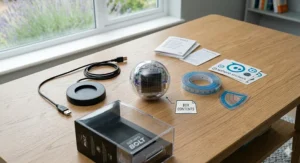
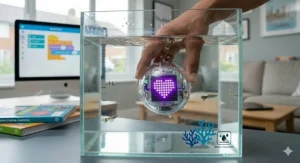
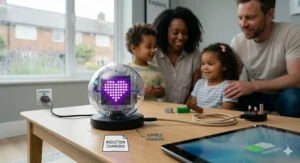
Battery life sits at around two hours of continuous play from a full charge, with inductive (wireless) charging via the included base — a detail that matters when you’re dealing with an eight-year-old who will definitely lose a cable. UK buyers should note the BOLT is durable and waterproof, so the odd spillage or British-garden puddle isn’t a disaster.
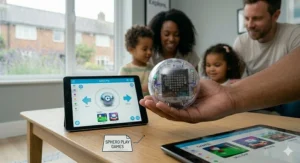
UK customers report that the Sphero Edu app is well-organised and the coding activities genuinely scale with a child’s ability — beginners start with Draw mode (literally drawing a path), progress to Scratch-style block coding, and eventually write JavaScript. For a parent with no coding background themselves, the app’s community library of pre-built activities means you’re not starting from zero.
✅ Three coding modes grow with your child
✅ Unmatched sensor suite for real-world data
✅ Waterproof and robust — built for real children
❌ Premium price is a genuine commitment
❌ Two-hour battery life requires forward planning
Price range: around £100–£160 on Amazon.co.uk. For what’s on offer, that’s fair value — though not pocket change.
2. Sphero BOLT+ — The Classroom Upgrade Worth Considering at Home
The BOLT+ is, essentially, the BOLT with its ambitions turned up a notch. It was named one of TIME’s Best Inventions of 2024, which tells you something about how seriously the educational technology community takes it. The key upgrade over the standard BOLT is a longer battery life (around 4+ hours), Python support alongside JavaScript, and enhanced durability aimed at the classroom environment — though that’s equally useful for the enthusiastic child who treats their belongings like sports equipment.
For UK families with more than one child, the BOLT+’s infrared multi-robot communication becomes especially compelling: you can set up drag races, collaborative maze challenges, and light shows with multiple units. The Sphero Edu app’s curriculum library for BOLT+ includes activities mapped to STEAM frameworks, which aligns neatly with the UK’s school computing expectations.
The honest caveat is that at the BOLT+ price range, you’re paying for a level of depth most children aged 8–10 won’t immediately access. It’s an investment in future capability as much as present entertainment. For a committed coder or school club, it earns every pound. For a casual gift, the standard BOLT hits the same sweet spot for less.
✅ 4+ hour battery — far less frustrating for longer sessions
✅ Python support for older, more advanced coders
✅ Built for classroom rigour and heavy use
❌ Noticeably more expensive than the standard BOLT
❌ The extra features may go unused for years on younger children
Price range: around £160–£200. Available Prime-eligible on Amazon.co.uk.
3. Sphero Mini — The Surprisingly Capable Budget Entry Point
Don’t let the small size fool you. The Sphero Mini — roughly the size of a golf ball — packs in the same Sphero Edu app compatibility as its larger siblings, offering Draw, Blocks, and JavaScript coding in a package that costs roughly a third of the full BOLT. For a British family wanting to test whether their child will engage with programmable robots before committing to a larger spend, this is a sensible starting point.
The trade-off is in the sensor suite: the Mini lacks the compass, light sensor, and infrared of the BOLT. The LED isn’t a matrix — it’s a single colour light. And the battery lasts around an hour, which feels short even by the standard of impatient children. That said, it’s waterproof, rolls at a genuinely nippy pace, and can still be programmed to follow paths, respond to tilt, and drive with precision.
UK reviewers on Amazon frequently describe the Mini as a “brilliant stocking filler” that outlasted their expectations. In compact British homes where storage is precious, its small footprint is an actual selling point.
✅ Accessible price point — excellent for younger or hesitant coders
✅ Same app ecosystem as the full BOLT
✅ Tiny and easy to store in small flats or bedrooms
❌ Missing the advanced sensors that make the BOLT special
❌ ~1 hour battery life is genuinely limiting
Price range: around £45–£60 on Amazon.co.uk. Strong value for an introductory coding toy.
4. Makeblock mBot Neo — The Best Balance of Building and Coding
The mBot Neo takes a fundamentally different philosophy to Sphero: rather than a polished sphere that arrives ready to roll, the mBot Neo is assembled by the child. That assembly — snapping together the robot car chassis, connecting sensors, clipping in the board — is itself a lesson in mechanical engineering. Once built, it’s programmed via the mBlock app (Scratch-based, with Python for advanced users), which is free and well-supported.
For UK buyers, the mBot Neo is attractively priced and offers arguably the best breadth of sensors in this bracket: ultrasonic distance sensor, line-following sensor, RGB LEDs, and the ability to expand with additional modules. The learning curve is slightly steeper than Sphero, but the payoff — a child who understands both the physical hardware and the code that drives it — is substantial.
What most UK parents overlook: the mBot Neo connects via Wi-Fi rather than Bluetooth, which means slightly better range but requires a home network. For families in terraced houses with thick walls and patchy Wi-Fi, this is worth testing before wrapping it.
✅ Assembly process teaches engineering alongside coding
✅ Wide sensor range at a competitive price
✅ Strong community and free curriculum resources
❌ Wi-Fi dependency can be finicky in some UK home networks
❌ Less durable than the Sphero — not waterproof
Price range: around £80–£110 on Amazon.co.uk.
5. Wonder Workshop Dash — The Best Robot for Younger Children
If the Sphero BOLT is aimed at a budding teenage coder, Dash is aimed squarely at the curious six-year-old who wants something to boss around immediately. It’s a pre-assembled three-wheeled robot with expressive LEDs, sound effects, and a personality — which counts for a surprising amount when you’re trying to hold a young child’s attention.
The coding apps — Blockly, Wonder, and Wonder Blockly — are genuinely polished and age-appropriate, easing children into sequencing and logic without overwhelming them. Accessories like a xylophone attachment and launcher extend the play value considerably.
The honest truth for UK parents: Dash doesn’t grow with your child as gracefully as the Sphero ecosystem does. A child who falls in love with Dash at six may outgrow it by nine. But as a first coding robot, it’s warm, approachable, and brilliantly made.
✅ Perfect starting point for ages 6–9
✅ Personality and sound effects sustain engagement
✅ Well-designed apps with genuinely guided activities
❌ Limited coding depth compared to Sphero or mBot
❌ Accessories add to the overall cost
Price range: around £70–£100 on Amazon.co.uk.
6. Ozobot Evo — The Hidden Gem for Creative Coders
The Ozobot Evo is unusual in the best possible way: it can be programmed both on-screen via OzoBlockly (a Scratch-like environment) and off-screen using colour-coded marker lines drawn on paper. Draw a red line, and Evo follows it. Add a colour code sequence, and it changes speed, dances, or changes direction. It’s genuinely magical to watch, particularly for creative children who respond better to physical, tactile activities than to a screen.
At its size — roughly a 3.5cm sphere — it’s one of the most portable coding robots available, which matters in the average British household where every centimetre of shelf space is contested territory. Schools have adopted it enthusiastically, and its compatibility with the UK KS2 computing curriculum is well-documented.
The limitation is depth: Ozobot tops out at OzoBlockly and basic JavaScript, and doesn’t offer the sensor richness of the BOLT. For a child who primarily wants to code rather than sense and react, that’s a meaningful gap.
✅ Unique colour-code programming adds physical, screen-free play
✅ Tiny and easily stored — ideal for compact UK homes
✅ Strong classroom and curriculum credentials
❌ Less sensor depth than Sphero or mBot
❌ Small size means it’s easy to lose under the sofa
Price range: around £70–£90 on Amazon.co.uk.
7. Botley 2.0 — The Best Screen-Free First Step
For the youngest coders — or parents deeply wary of adding yet another screen to the household — Botley 2.0 is the answer. It’s a cheerful little robot car programmed entirely through physical buttons on a remote control: no app, no tablet, no phone required. Children press directional buttons to build a sequence, then watch Botley execute it. Simple. Direct. Brilliantly effective for ages four to eight.
The 2.0 upgrade over the original adds obstacle detection (Botley stops rather than tumbles off the table), looping commands, and coding for conditional events — a remarkably sophisticated concept delivered through button-pressing rather than syntax. UK parents report it’s one of the few tech toys their children share successfully across a wide age range.
The ceiling is low: once a child outgrows simple sequences, Botley has nothing left to offer. But as a gateway drug to computational thinking, it’s nearly perfect.
✅ Genuinely screen-free — a rare and valuable feature
✅ Age-appropriate for four-year-olds right up to primary school
✅ Obstacle detection makes it safer and more forgiving
❌ Limited complexity — children outgrow it by age 8 or 9
❌ Requires six AA batteries (not included — very British of it)
Price range: around £45–£65 on Amazon.co.uk.
Getting Started: A UK Parent’s Practical Guide to the Sphero BOLT
Setting up the Sphero BOLT is refreshingly painless — even by the standards of British parents who’ve spent Christmas morning swearing at flat-pack instructions. Here’s what the first week actually looks like.
Day one: Charge the BOLT on its inductive base for around six hours before first use. This is the single piece of advice the box doesn’t shout loudly enough. Download the Sphero Edu app (free, available on iOS, Android, Mac, and PC — check Amazon device compatibility if you’re on an older Kindle Fire). Pair via Bluetooth. Follow the calibration step to aim the BOLT using the blue tail light. Done.
First session: Use Draw mode. Literally draw a path on the screen and watch the BOLT follow it. For most children, this moment — watching a real object obey a line they drew — is the hook. Don’t skip it in favour of “proper” coding too quickly.
Week two: Move into Block coding. The Sphero Edu community library has hundreds of pre-built activities — maze challenges, maths games, sensor experiments. Let your child browse rather than assigning specific tasks. Self-directed exploration retains interest far longer than structured lessons.
UK-specific tips: The BOLT is waterproof, but its inductive charger is not — keep the base away from the kitchen sink and damp bathroom shelves (the British bathroom’s natural humidity is a slow enemy of electronics). Store the BOLT in its travel case if you have one, or in a dry drawer. Avoid leaving it in a car overnight in winter, as sustained cold affects battery health.
For families in flats or terraced houses with limited floor space, a smooth hallway works brilliantly as a coding track. The BOLT’s sensors mean you can programme it to navigate a corridor, stop at a specific distance from a wall, and return — all in an afternoon.
Real-World UK Scenarios: Which Robot Suits Your Family?
Every family is different. Here are three specific UK profiles and the honest recommendation for each.
The Manchester suburban family, two children aged 7 and 11. Budget is a consideration. The seven-year-old wants immediate fun; the eleven-year-old wants actual coding depth. The right choice is a single Sphero BOLT — the Draw mode satisfies the younger child while the older one can work through JavaScript tutorials independently. One robot, two users, different modes. Total investment in the £100–£160 range.
The London primary school teacher looking for a classroom tool. Thirty children, varying ability levels, limited time for setup. The Sphero BOLT+ is the right call here — its longer battery handles back-to-back lessons, Python support challenges the more advanced pupils, and the Edu app’s activity library reduces lesson-planning time considerably. The multi-BOLT infrared communication turns group activities into genuine collaborative computing projects. As the National Centre for Computing Education notes, hands-on, physical computing tools significantly increase engagement in digital literacy — especially among girls.
The rural Cotswolds household, one child aged 8, limited local activities. Here, the depth of the Sphero ecosystem matters. The online community library, the ability to share code with other Sphero users worldwide, and the scalability from beginner to advanced JavaScript means this robot can sustain interest across years, not months. In areas where after-school coding clubs are rare, that longevity is genuinely valuable.
How to Choose a Coding Robot in the UK: 5 Questions to Ask First
Rather than buying on impulse (however tempting that Amazon Prime next-day delivery makes it), work through these before committing.
1. What is my child’s current relationship with technology? A child who already shows interest in games, apps, or how things work will engage with block coding immediately. A child who’s primarily drawn to sport and outdoor activity needs a robot with enough personality and immediate gratification to hook them — Dash or Botley first, Sphero later.
2. How much coding depth do I actually need? For pure exploration and fun, the Sphero Mini covers a lot of ground for considerably less money. If your goal is genuine computing education — if you want your child writing JavaScript by age twelve — the full BOLT is the investment worth making.
3. Will more than one child use this? The Sphero ecosystem’s different coding modes mean siblings of different ages can all access the same robot at their own level. The mBot Neo, by contrast, may frustrate a six-year-old trying to use something their ten-year-old assembled.
4. Does screen-free matter to your household? If reducing screen time is a priority, Botley 2.0 is the only option on this list that delivers genuine coding concepts with zero screen involvement.
5. What’s the realistic budget in GBP? Be honest. A £150 robot that sits unused after three weeks is worse value than a £50 robot that gets picked up daily. Consider your child’s engagement history with tech toys before climbing to the premium tier.
Sphero BOLT vs Traditional STEM Toys: Is a Coding Robot Actually Better?
| Feature | Sphero BOLT | Traditional STEM Kit (e.g., circuit board, science kit) | Screen-Free Coding Toy (e.g., Botley) |
|---|---|---|---|
| Coding depth | ⭐⭐⭐⭐⭐ | ⭐ | ⭐⭐ |
| Physical engagement | ⭐⭐⭐ | ⭐⭐⭐⭐⭐ | ⭐⭐⭐⭐ |
| Longevity (years of use) | ⭐⭐⭐⭐⭐ | ⭐⭐ | ⭐⭐ |
| Ease of first use | ⭐⭐⭐⭐ | ⭐⭐ | ⭐⭐⭐⭐⭐ |
| UK curriculum alignment | ⭐⭐⭐⭐⭐ | ⭐⭐ | ⭐⭐⭐ |
| Price-to-depth ratio | ⭐⭐⭐ | ⭐⭐⭐⭐ | ⭐⭐⭐⭐ |
The BOLT wins comprehensively on depth and curriculum alignment, which matters increasingly as the UK’s computing curriculum continues to evolve. Traditional STEM kits — circuits, chemistry sets, mechanics kits — remain excellent for building hands-on scientific intuition, but they don’t teach computational thinking in the same structured, progressive way. The real answer, as with most things, is that they’re complementary rather than competing. But if you have to choose one, and your child is 8+, the BOLT’s longevity and depth make it the stronger investment.
✨ Don’t Miss These Exclusive Deals!
🔍 Ready to add a Sphero BOLT or one of its competitors to your basket? Click on any highlighted product name in this article to check current pricing and availability on Amazon.co.uk. Prime members enjoy next-day delivery on eligible items — worth checking before you order.
Common Mistakes When Buying a Coding Robot in the UK
Buying for age rather than interest. The age recommendations on packaging are floors, not ceilings. An exceptionally curious six-year-old can get meaningful use from a Sphero BOLT with parental guidance; an uninterested ten-year-old will ignore a Dash after a week.
Ignoring the app ecosystem. The robot is only half the product. Before buying, check that the companion app is available on the devices your household actually owns. The Sphero Edu app runs on iOS, Android, Mac, PC, and Chromebook — broad coverage. Some competitors are iOS-only, which matters if your household runs Android tablets.
Buying US-voltage models from grey market sellers. This is less of an issue with robots than with, say, kitchen appliances (the BOLT uses a USB-based inductive charger compatible with standard UK USB adaptors), but always verify the seller on Amazon.co.uk is shipping from UK warehouse stock. Look for the “Sold by [UK seller] and sent from Amazon Fulfillment” note on the product page.
Underestimating the parental involvement required. The Sphero Edu app is excellent, but for children aged 8–9, the first few sessions benefit enormously from a parent sitting alongside. You don’t need coding skills — the app is designed for non-coders — but you do need to give 20 minutes. Many parents report that this shared activity became an unexpected highlight, not a chore.
Buying at the wrong stage. A Sphero BOLT given to a five-year-old is mostly wasted — the coding concepts require a level of logical thinking that develops between ages seven and nine. A Botley 2.0 given to a twelve-year-old will be dismissed in an afternoon. Match the product to the stage, not the wishlist.
Long-Term Value & Total Cost of Ownership in the UK
The Sphero BOLT’s cost doesn’t end at the purchase price — but it comes closer to ending there than most educational toys in this bracket.
The Sphero Edu and Sphero Play apps are completely free. There are no subscription fees, no locked content, no in-app purchases. The community activity library runs to thousands of programmes contributed by teachers and enthusiasts worldwide, and it’s all free to access. Over three to five years of use — which is a reasonable expectation for a child who engages seriously with it — the effective cost per day drops to genuinely modest levels.
Accessories are optional rather than mandatory. Code mats, storage cases, and BOLT+ expansion accessories exist for schools that want them, but the base robot is complete out of the box. Replacement parts, should you ever need them, are available via Sphero directly and from third-party UK sellers.
The one ongoing cost to be aware of: the BOLT’s inductive charging base is proprietary. If lost or damaged, a replacement costs around £15–£25 from Sphero or Amazon UK. It’s a small annoyance on a premium product, but worth mentioning.
For UK buyers comparing the BOLT’s total cost of ownership against a traditional robot construction kit, the picture is favourable. A LEGO Technic set of comparable educational value often requires ongoing purchase of additional sets to sustain interest, while the BOLT’s software-driven depth is theoretically unlimited. Under the UK’s Consumer Rights Act 2015, you’re also entitled to repair, replacement, or refund within six years if the product develops a fault — considerably stronger protection than many parents realise.
FAQ: Sphero BOLT — Real UK Questions Answered
❓ Is the Sphero BOLT available on Amazon.co.uk with fast UK delivery?
❓ What age is the Sphero BOLT suitable for in the UK?
❓ Does the Sphero BOLT support the UK national computing curriculum?
❓ Can the Sphero BOLT be used outdoors in UK weather conditions?
❓ Is the Sphero BOLT+ worth the extra cost over the standard BOLT?
Conclusion: Should You Buy the Sphero BOLT in 2026?
The Sphero BOLT is one of those rare products that manages to be simultaneously a decent toy and a genuinely excellent educational tool — which, if you’ve ever attempted to make broccoli exciting, you’ll appreciate is no small achievement.
For UK families investing in a long-term coding companion for a child aged 8 and up, it’s the most compelling option at its price point. The sensor depth is unmatched, the app is polished and free, the waterproof durability handles British children admirably, and the coding progression — from drawing paths to writing JavaScript — can genuinely carry a child from primary school through to early secondary without running out of road.
Is it perfect? No. The two-hour battery life on the standard model requires planning. The price is a commitment in 2026’s economic climate. And it demands at least some parental engagement in the early weeks to reach its potential.
But if you’re looking for a tech gift that earns its shelf space — one that actually delivers on the educational promise rather than gathering dust by February — this Sphero BOLT review lands firmly on the side of: yes, it’s worth it.
✨ Ready to Buy? Check Current Prices on Amazon.co.uk!
🔍 Click any product name in this article to view current pricing and availability. Whether you’re picking up the full Sphero BOLT, the upgraded BOLT+, or starting with the more accessible Sphero Mini, Amazon.co.uk has Prime-eligible options with fast UK delivery.
Recommended for You
- Wonder Workshop Dash vs Cue: Which Coding Robot Wins in 2026? (UK Guide)
- Best Coding Robots for 10 Year Olds UK 2026 — Top 7 Picks
- Cubetto vs Matatalab Which Is Better for Kids in UK 2026?
Disclaimer: This article contains affiliate links. As an Amazon Associate, I earn from qualifying purchases. If you purchase products through these links, we may earn a small commission at no additional cost to you.
✨ Found this helpful? Share it with your mates! 💬🤗
